


Most people who have a LinkedIn account assume that when they retire, they should let it lapse, perhaps even delete it. Doing that, however, is a mistake. While you may not be working as much as you did before retirement, keeping your profile up to date and periodically checking in on the social site is worth your while as you explore your post-full time working life.
Here are some tips for handling your LinkedIn account as you prepare to step back from your current career.
Stay Visible
For many people retirement is a time to explore new interests that may or may not be related to the career they held. If you have a LinkedIn profile, updating it rather than deleting it can help keep you on people’s radar or help you consider other options that may arise.
Why this matters:
- It keeps your professional history searchable for part-time, volunteer, consulting or passion projects.
- It helps you stay connected to people who may share opportunities you didn’t know existed.
- It allows you to control your narrative during retirement transitions.
Edit Your Headline
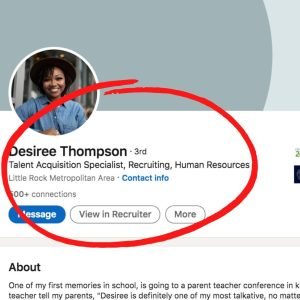 It would seem like adding the word “retired” to the current position listed on your profile headline is the obvious edit, but experts insist that this is a mistake. “Retired” indicates that you’re done with the working world. It conjures up images of someone sitting around, watching daytime TV with a cat in their lap. Instead, use adjectives like “former” or “unretired,” and use the rest of the headline to explain how you want to be of service going forward. If you’re unsure of what you’d like to pursue next, indicate that by listing what you’re open to considering.
Headline examples retirees can use:
- “Former Marketing Director | Open to Consulting and Community Projects”
- “Unretired Engineer Helping Small Businesses Solve Technical Challenges”
- “Writer and Former Educator | Exploring Volunteer and Mentoring Opportunities”
- “Former Healthcare Administrator | Supporting Local Nonprofits”
How to update your headline:
- Go to your LinkedIn profile.
- Click the pencil icon next to your name.
- Enter a short, clear description of what you want to be known for now.
- Avoid simply typing “Retired.”
- Save and review how it looks on desktop and mobile.
Use Your Profile Summary
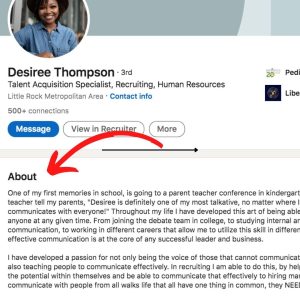 The next step is to edit your summary to clarify things. Your LinkedIn Profile summary is the text box at the top of your page, just under your photo. It is meant to be used as an “About” section, and it’s your chance to define yourself in your own words. This is the place to put career choices into context, highlight your biggest achievements, or simply show off your personality. It’s your “cover letter,” and will be the first impression for people viewing your profile. If you’re looking to pursue opportunities like part-time work or volunteer gigs, this is a great place to express what it is you offer and what you’d like to explore. If you have no idea what’s next, this is the place to share that, too!
Summary examples retirees can use:
- “Former educator with a passion for community enrichment, mentoring and creative writing.”
- “Recently transitioned from corporate HR and exploring consulting, volunteer work and advocacy roles.”
- “After 30 years in healthcare leadership, I’m diving into local nonprofit work and part-time advisory opportunities.”
How to update your summary:
- Open your profile and find the “About” section.
- Click the pencil icon.
- Add a short paragraph describing who you are now and what you’re interested in.
- Keep it friendly, clear and future-focused.
Don’t Delete Anything!
Even if your retirement plans are totally unrelated to your career — maybe watching daytime TV with a cat in your lap has been a lifelong dream — deleting your work experience and skills from LinkedIn would be a hasty mistake. Those details help to paint the complete picture of who you are and what you can do. Maybe there’s an opportunity that would be perfect for you, that you’d never discover if that information wasn’t out there as searchable data.
Why you should keep your work history:
- Your experience makes your profile more trustworthy and complete.
- Old colleagues may search for you for collaborations or projects.
- Your skills help match you with volunteer, advisory or part-time opportunities.
Follow for Inspiration
 Even if you’re not looking to attract work opportunities, LinkedIn is an easy way to keep in touch with old colleagues. Retirement can be a rough adjustment, as it usually entails a significant loss of social interaction, so keeping tabs on friends via social media is a good way to stave off FOMO (aka: fear of missing out.) And don’t be a lurker! “Like” when old friends post their achievements and comment on posts that you’re interested in, so that your name is still showing up on people’s feeds. If you maintain some of the more important contacts that you made while working, you never know when those relationships could come in handy. You may not be interested in opportunities now, but there’s no sense in burning those bridges completely … just in case.
In addition to following your own contacts, it could be helpful to follow other inspirational people. As other social media changes, LinkedIn is becoming a place to cultivate ideas and information. There are many influencers — for lack of a better term — on the site that are of retirement age and living their best lives. Why not gather ideas for post-retirement adventures from them?
Frequently Asked Questions
Should I delete LinkedIn when I retire?
No. Keeping your LinkedIn profile active helps maintain valuable connections, keeps your experience visible and opens doors to volunteer, advisory or part-time opportunities.
What should my LinkedIn headline say after retirement?
Avoid simply writing “Retired.” Instead, use “former,” “unretired,” or describe the types of work or volunteer roles you’re open to.
Should I delete old job experience?
No. Your work history helps others understand your background and may lead to opportunities you didn’t expect.
How often should I check LinkedIn after I retire?
Once or twice a month is enough for most retirees to stay visible and engaged without feeling overwhelmed.
Other Articles You Might Enjoy: